Microsoft has recently announced their plan to stop selling the Live OneCare security suite by June 30 2009 and the intention to replace it with a free security kit called Morro.
Morro will be a PC security solution but will be also have a smaller footprint tailored for “smaller PC form factors” such as netbooks, and will be “ideal for low-bandwidth scenarios or less powerful PCs”. It will offer protection against viruses, spyware, trojans and rootkits. Morro will use the same engine as Live OneCare does.
Morro is announced for the second half of 2009 just in time for Windows 7 and Vista SP2. Morro won’t be integrated into Windows, but it will be offered as a separate download, perhaps in order to avoid another antitrust suit. It will offer basic malware protection for Windows XP SP3, Vista and future Windows 7. Morro will be free.
Microsoft has also announced that it will discontinue the Live OneCare subscription by June 30 2009. Beside security protection, Live OneCare currently offers printer sharing, data backup and PC tune-up, features that will not be made available in Morro. Live OneCare costs $50 for 3 PCs for one year and counts for 2% of the market, while Live OneCare for Server is a dead product which might explain the move.
11/29/2008
End of Microsoft OneCare and new kid in the block

8/13/2008
Server migration made easy with Symantec
This is a another successful job I complete recently which I wanted to share with you all. The scenario is to move an production application service from a desktop PC to a new server with minimal impact to the production environment.
The desktop has been running Latest Anti virus Management service in it with windows 2003 server OS and serving nearly 1000 clients PC's. Everything running smoothly until we hit the idea of this was running in a standard desktop PC.
So we brought a new IDM server with a Xeon processor and a Raid 0 build. Our main task has been moving the AV server database and the roles from the production PC to the server but not doing any installation at the client PC's. Client PC's' has been distributed around the country and hence doing any modification to all of them would take months time which we dare even to dream. So we came up the idea of testing this with one of the software offered by Symantec called as Symantec Backup Exec System Recovery.
First we install the software the production server and ran the Liveupdate to make sure it get the latest software updates to the particular software. After that we had to register the product. Registration is necessary if you're doing a migration for dissimilar hardware which is true in our case. Ran the disk cleanup and in house cleaning for prior to the image creation. After that using the BESR we created and image of the C partion in a network drive.
Now the part of moving the image to the new server. Before that according to the Symantec information we created a custom bootable recovery CD. This CD has a database of most hardware device drivers you can find in the market. Boot the new server with the BESR recovery CD and once boot we are been welcome to a VISTA PE environment and asking the question to star the network services. Since we have our image created in a network share we wanted to start the network service in the new server. Assign a static IP to the new server and then we map the network which contains the image. Once that completed in the main page we had the option to select to recover my computer and then give the path to the image file. Once the image has been identified we have to go through several screen requesting how we want to restore the image, one important option is to select we're doing a restore to a different hardware. Apart from that you get the chance of changing the partion size, verify the image after restoration, restore the MBR...etc. Once those options has been adjusted it matter about the time it take to restore the image from the network to the target machine. Restoration time will be entirely depend on the network or the hardware equipment. If you have copied the image to a external removable media and trying to restore it from there this process will be much more quicker. For the above process it took 25 minutes to restore 30GB image over the network. Assuming if you had gigabit network or less traffic in that network the time will be reduced dramatically.
Once the restoration is completed target server restarted and went through the process of detecting the new HAL components. The only time it stops is for requesting the raid controller driver which we provided from the network location path itself which we have copied earlier. Once the process is completed we had to add the server to the domain. Entire process took around 1.5 hours and the new serer is up and running to server the clients!!
As you can imagine this is real time save to move old servers to new servers without a sweat. We've been using this tool to convert our live servers to virtual environment then virtualizes all the servers as well. If you have specific questions you can PM me or alternatively you can meet me via
MSN susanthasilva@hotmail.com
I've provide few links below which describe about the above mention software,
http://www.symantec.com/business/products/family.jsp?familyid=backupexec
http://techcenter.symantec.com/ecampus/enterprise?siteName=sena&courseNo=DP6000
4/27/2008
New era in Anti virus software
This is silent war topic going on the AV vendors. As a person who's work related to this industry I thought of sharing my 2 cents opinion on this.
Few years back working with AV with the signature file updates has been pretty adequate. But the landscape changed dramatically with the rise of the various vulnerabilities coming from web as well than any one expected. So here we are now talking about spyware, malware, browser hijacking, man in the middle attacks, bots, phishing...etc (more to come in da future) So now all the AV vendors has identified protecting Pc's from virus signature files is no longer a reliable solution. So now we've been offered with a new solution called EndPoint Protection. So this time the explanton is we not only need to protect the individal pc's but as well as the endpoints like network ends. In a certain way this makes a pretty sense. Most of the employees are now working mobile and heavily depend on mobile devices like laptops, palmtops..so when they roam around the country, world they can bring pretty nasty vulnerabilities to your network. So this is the place where your first defense should work. In firewall we talk about this as layered security. So we protect the network from the endpoint level so Pc's will be check against the company security polices even before they are allowed to connect to the co-operate network. So the last defense would be the antivirus with various other components integrated.
So my understanding is network administrators and security mangers would give more attention to this and identify why endpoint security is more reliable. So the main quote is "AV is not enough for your company" Many AV vendors has already adopted this technology and come up with various solutions. Symantec, Mcafee, Kaspersky has already entered to this race. So give it a consideration how should you protect your network and doing so save your neck....!!!
3/21/2008
VMware ESX Server 3i
So VMware back into my life with their latest edition for the enterprise market. VMWare ESX server. Now we all ma have used VMware workstation for and VMware server in our home pc's for testing applications and operating systems. But VMware ESX is the big daddy of all of them and actually involve in server virtualization, resource management and cost savings...etc. This product is not depend n windows or Linux as a host OS but starting with it's own OS! By doing so it make sure it'll take minimum hardware resources from your actual serer and let the raw power to be distributed to the virtual PCs. Most of the enterprise data centers move to VMware ESX for numerous reasons and few are as follows,
1 Decreases power, cooling, floor space and infrastructure.
2 Simplifies disaster recovery and business continuity requirements.
3 Increases server utilization from the typical averages of 5-15% to 60-80%.
4 Faster deployment of information technology resources reduces time to market.
5 Lower operational costs associated with reduced resource management and administration.
6 Improves application performance by dynamically adapting storage and server resources to meet peek usage cycles. and much much more.
So I thought of sharing some VMware guru's articles into this blog to make it more useful for everyone.
http://www.petri.co.il/vmware-esx-server-3i.htm
http://www.petri.co.il/vmware-infrastructure-esx.htm
http://www.petri.co.il/vmware-consolidated-backup-utilities.htm
Happy Virtualization to all.
1/01/2008
Happy New Year 2008!!!
It's a another fresh start and lots of things to cover. So how it's going to be for us in IT side? Well let's ride and see...
10/25/2007
P2V (Physical to Virtual) Conversion
This is the concept that been buzzing around the IT world. Convert your physical machine to Virtual.(Not exactly the correct meaning as it is, but we’re talking about converting the OS and the apps in the physical to virtual OS that can be run on any platform. VMware company goes extra mile to introduce this method and really keep on their word on it. They are so keen about this concept and released out a free tool to people to test this method. This software can be downloaded here (http://www.vmware.com/download/converter/)
Actually they have come with 2 version and more details can be found from the VMware web site itself.
So I took the liberty of testing this out in our office Exchange server!!!!! (People don’t try this out in your office unless you got a another job) I have given a task of cleaning out the mess in our exchange server and remove the unnecessary mail boxes. Knowing this clean is not the best method than a fresh installation I thought of trying this out. So my first task is downloading the software and then install it to the Exchange server itself. After that I make sure we have a spare server or a hard disk with enough free disk capacity for the migration. Armed with all the necessary tools and the brains start the process. Cannot recall the whole time it took for the conversation but I assume it was around 6 hours. (I start the process in a weekend and found it was completed when I arrived to office on Monday)
So what I found is a 30GB vmdk file! Start the Virtual server in a dual core machine and start the vhdk file assigning 1GB ram. The process went smoothly and after the bootup I had to install the VMware tools get the connectivity with the actual network. After assigning the IP connectivity I brough down the physical PC down. I ran the company Exchange server in a virtual environment for 2 weeks time. The only problem I found is network card stop sending packets and loosing the connectivity once in a while. I assume I have not done a proper house work for the virtual file. (Assuming I have to boot the virtual OS in safe mode and remove the existing network cards and then let the VMware tools to install its emulated network drivers.) But apart from that whole project is a success.
I really like to hear from others who have done a process like this. My next plan is to host a SharePoint portal server and our anti virus server (Symantec Endpoint Security) in virtual appliances and host in one physical server.
Virtualization is a cool concept and sooner or later it will crawl into you office too. So be prepared!!!
7/08/2007
So I'm MCSA now
It relly took me 2 months time and my previous job experince really helped me in that. I still think SBS exam is really worth for the money. The product itself really cool and really look forward to post some information about it soon. One cool product I start to fall in love is Microsoft ISA server 2004/2006. I know Cisco rocks in everyones minds, but this is a cool product to give a serious thouhgts. Glad to Local IT security giving attention to that. Look forward to share some information with other peer members about this product.
So that's my small roaring about the MCSA and look forward to get few more certificates under my belt and look foward to Windows 2008.
4/22/2007
Ubuntu back in action
In my previous articles I've mentioned I use the version 6.06 and 6.10 and been really impressed with their easiness of usage. New version has even more promsing features and also options to data and user migrations from windows operating systems. The truth is Microsoft Vista has been requesting lots of resources leaving it's customer base with less options. Most of them are looking for alternatives and to keep their existing PC's. Specially in Asian countries windows Vista migration might get slower phase due to the Computer hardware component prices. Microsoft still hasn't come up with good pricing schmene for the developing countries and this is another kep point they loose average Joe's. Anyway I've not yet installed the latest version cause it's still on it's way through ADSL line (lol)
Will update the blog one I get my hands dirty on the product. But in da meantime I found out the following features and offered bt the product,
Windows migration tool - The new migration tool recognises Internet Explorer favorites, Firefox bookmarks, desktop wallpaper, AOL IM contacts, Yahoo IM contacts and imports them in Ubuntu. This offers easier and faster migration for new users of Ubuntu and individuals wanting to run a dual partition. In addition to single accounts, you can migrate several users' settings in Ubuntu. (I think this may get rapid improvement to support more data to be transferred)
Easy installation of multimedia codecs -Playing an MP3 or other media file just got a lot easier. If the required pieces are not yet installed, 7.04 will get the correct codecs for you, no more searching and no need for long and complicated instructions.
Easier connection to wireless networks - This is really timesaver. Just like windows XP wireless configuration options. Configuration going to be breeze.
apart from that Ubuntu 7.0.4 using the latest kernel (2.6.20) and Gnome's most awating 2.18 desktop enviroment.
1/21/2007
Cannot clear ARP cache
After quick Googling I found out this problem is common for all windows versions. Foud out various answers and most popular one is clearing the ARP cache through command line (netsh interface ip delete arpcache) Microsoft has been kind enough to offer the solution starting from ABC (http://support.microsoft.com/kb/314067)
Just a another day in computer nightmare! Hope to see a ray of light tomorrow. Will post as soon as I come up with an answer.
Cheers
1/04/2007
How to survive in OS battle in year 2007
But things may change as usual. If we look into the Windows OS history most of us keep on moaning and blaming when they initially released their OS. I remember most of us blamed windows XP and told we'll stick to to windows 2000 Professional no matter what. But it changed ultimately. Even though we moan about the windows Vista hardware requirement in the market we se hardware components exceeding Vista requirement and far more capability packed. But it's the question is how far we want to go on purchasing hardware and software to do the same task we did years back. As always security and information theft is a the biggest risk in the current and present future. So software vendors have busy time looking after their product and keep on covering their products t minimize such attacks.
As a summary of the situation I see year 2007 will be interesting place for OS battle. With Microsoft windows Vista and their latest server product range their will be significant change from the fans for the Linux world. They will think twice before jumping to OS.
12/16/2006
Is Ubuntu really play well than windows?


12/11/2006
Linux OS in a USB Flash Drive
http://www.pendrivelinux.com/index.php (This site provide instructions to install various Linux flavours to USB drives. The instructions are easy to follow to a newbie.) If you're still not sure to do this then go ahead and buy a USB flash drive preinstalled with Linux OS. Good option will be buying the following product,
http://store.mandriva.com/product_info.php?products_id=277
Cheers!
12/04/2006
Free Online data backup
https://mozy.com/?ref=XEL4QC
11/09/2006
In my previous post I've mention about the Ubuntu Linux. This is the most famous and easy to use Linux OS I've found. I decided to move to Linux instead of Windows in my Dell Inspiron 6000 laptop. To my surprise I found Linux Os if much more quicker in responding time than the Windows XP. I'm really happy about that speed gain up. My machine spec is Intel M1.6 GHz 512 MB Ram, 40 GB 5400RPM HDD,...oh and share memory for the Intel VGA card.
First start with Ubuntu Linux 6.05 version and found out they have released the 6.10 version on 26th October 2006. This one code name as Edgy Eft. Upgrade process too long time than the new installation but it has greatly improved the speed. I prefer o stick with Gnome desktop environment. It is less graphics and response is much quicker. But if you're moving from Windows environment this will not make you unhappy.
11/06/2006
Vmware player in Ubuntu Linux
I was really happy I don't have to download any packages and go through lots of fiddling, unfortunately this didn't work for me. I get and error message when I tried this option. So what case the problem? It's just a simple matter of enabling the correct repositories. All you have to do is,
system-->software sources-->(select) software restricted by copyright or legal issues (multiverse).
After that it will update the sources list with additional download locations. So that's it. Go to the terminal windows (command prompt in windows language ...lol) and type sudo apt-get install vmware-player.
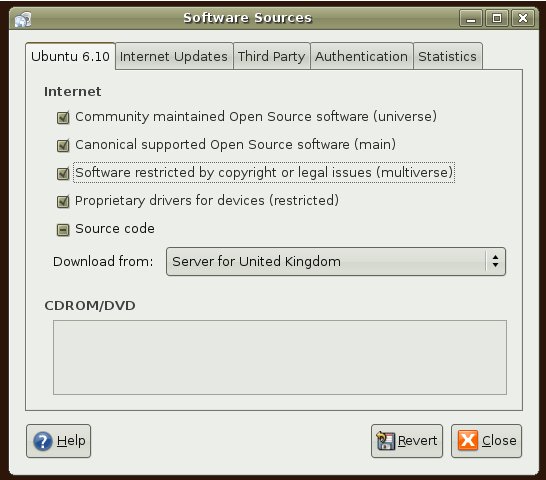
If you like to install the Vmware-server in your Ubuntu system then visit the folowing link,
http://www.howtoforge.com/ubuntu_vmware_server
11/02/2006
Welcome to Linux World
Screen shots
more screenshots
9/23/2006
Some free utlities to make your life easier
2. Photoshop alternative ( to my knowledge) Download
3. Find your computer hardware information . Authors page
4. Did you whish for a proper windows temp files cleaner? This is it. Download
5. Good firelwall software (5 stars goes for this product from me) Download
Hope someone will find these untilties helpful in their day to day working life.
Walking through Windows Vista
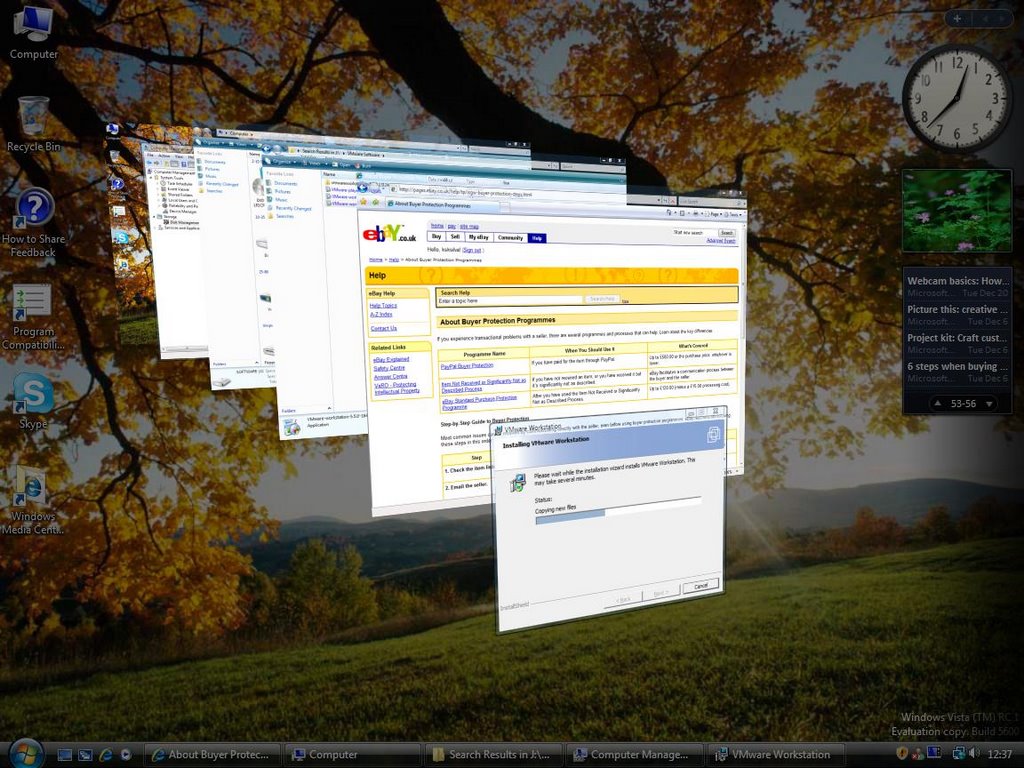
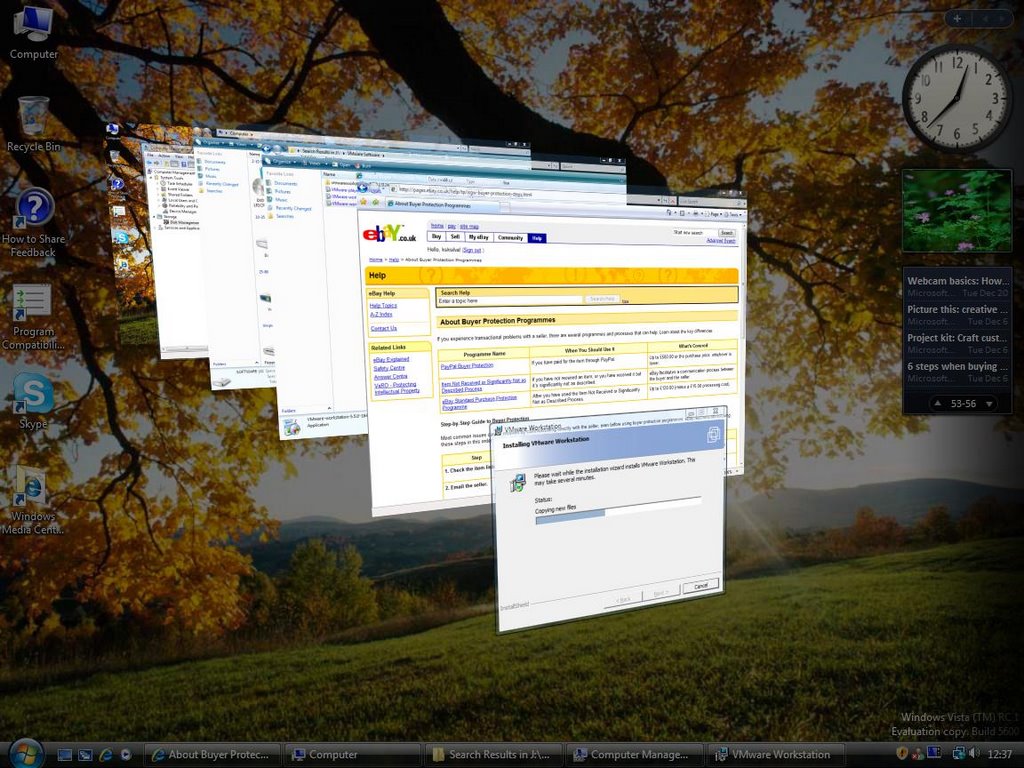
Always wanted to get my hands into latest software and test them out. I was so anxious to get my hands into Vista and try it out. Heard they released teh RC1 23rd of September for public. Manged to download a small 2.3 GB iso file. (lol) At first I went through upgrading which took nearly 8 hours and ended up with BSOD!
Next armed with a another hard disk went through the installtion which took nearly 1.30 hours. My machine specs are (AMD XP 2500+, 1024 Ram and 120 GB 5400 RPM hard disk) Windows Vista gave me only 3.4 points out of 10 to my machine! (too bab) But all along it runs smoothly. I am quite happy with that performance but so far didn't dig too much into the features even though I notice Microsoft had taken quite a step improving the visual effect rather than finxing the software problems (lol) I've attached few pics to show how it looks like. I couldn;t run my favourite programs like Alcohol120% CD emulating software and Nero. But manged to install the VM Ware workstation software in it.
6/02/2006
Testing MS Office 2007 Beta 2
Microsoft Office 2007.
I’m glad of the new appearance of the MS office product suite. You can publish your word document straightly to you Blog! So far I’m in the initial stage of testing the software. But I’m already starting to love its features. Now Microsoft has released MS Office Beta2 for public. You can download it from following link,
http://www.microsoft.com/office/preview/beta/getthebeta.mspx
Microsoft also recommend to download and test your system for compatibility with the existing documents. Tool has been provided to download and test in your machines.
http://www.microsoft.com/office/preview/beta/converter.mspx
Susantha
02nd June 2006
5/01/2006
Playing Diablo 2
I've to admit I'm like to play computer games as a hobby. I whish I can upgade my AMD XP desktop in order to play better games but not doing so will also let me time to spend in my studies. Well I'm fooling my ownself!!!

