2/17/2009

How to sysprep Windows 2008

I spend most of my time with virtual PC’s creating recreating for testing. one thing I hate is to create new virtual PC’s for testing. Instead of that I prefer to use a clean installed OS cloned. Now this has been working fine for me in Windows XP, Windows 2000/2003. I just do a cloning under VMware and then run the Newsid utility and then join to the domain. There you go easy as that. But now with windows 2008 Sysinternals haven’t given any tools ( I mean properly working newsid) So we have to rely on Syspep method.

In windows 2000/2003 time you will have to find these utilities in the media. Now with the new kid it’s already in the pocket. You just got to %WINDIR%\System32\Sysprep and then run the sysprep.exe
If you want to create a new SID, remember to CHECK the “Generalize” checkbox - or else you have to go all over again…

image

That’s it. Happy cloning guys/gals.

2/16/2009

Windows 7 – Problem Step Recorder (PSR)

I have been using Windows 7 in a VMware PC and I’ve to agree this OS is really cool. I have only given 1 GB memory for that and the functionality wise this stable. I didn’t encounter any system crashes so far. Now looking around in the TechNet about further enhancement about this product I found a nifty tool integrated in Windows 7 called as PSR (Problem Step Recorder)

Basic idea behind this tool is allow user to do screen capturing of the problem they encounter and then send that to a technical person. Now this is a life saving feature for any technical person in order to provide support for a en user. Think about a helpdesk environment where end user and technical person spend endless time discussing about the error message. There are few key things helpdesk may fail to solve the problem properly to the end user,

1. End user cannot describe the problem properly since he is not very technical person.

2. Technical support person cannot recreate the problem in his side according to the information he is getting from the end user.

3. Problem can be a totally new one for both parties.

So using this screen capture tool end user will be able the capture the error he encountered and then send to technical person via e-mail or any other preferred method.

More information can be found over here.

2/01/2009

Windows 2008 / windows Vista SP2 (beta) overlook

Beta is out there to download for everyone. TechNet and MSDN subscribers can download the SP2 CPP now from their portal. Now good news is windows 2008 service Pack 2 can be applied to Vista computers as well. The secret behind is that both operating systems use the same codes. This brings a huge advantages to administrators when they want to deploy the service pack to the computers in their organizations. So what are the new advantages on this service pack? Well in the server side few things are as follows,

  • Improved power savings over the RTM release of Windows Server 2008
  • Integration of Hyper-V into Windows Server 2008.  SP2 includes the Hyper-V RTM Code.
  • All previously released hot fixes and security updates are rolled into SP2 as well.

As per the client pc side,

  • A new Wireless Feature Pack and fixes for issues where Wi-Fi Connections were lost after resuming a PC from Sleep.
  • A really cool service pack clean-up tool that restores hard disk space by deleting the previous versions of the files serviced by Windows Vista SP2.
  • Of course this service pack includes all previously released updates, hot fixes, and patches since the release of Vista Service Pack 1.
  • Let you record data onto Blu-ray discs
  • Give you the latest desktop search engine, Windows Search 4
  • end users are advised to await until the final version out. More information can be found here.

    1/30/2009

    MSN messenger latest version

    With the introduction of the windows VISTA/ Windows 2008 SP2 beta , Windows 7 Microsoft also has released the next version of MSN messenger. You can grab it from here,

    One cool thing I notice is you can have animated pictures or video clips you have captured from your web cam as MSN picture. This is really cool.

    1/29/2009

    How to enable hibernation option in windows VISTA

    If you have notice some PC /Laptop hibernation option is not visible under the power management. I was curious to find out same problem occurring in my laptop as well. Further search revealed it’s a matter of enable or disable it via running few commands from the command prompt :) But again windows annoying UAC come into the picture so we need make sure we run the commands under proper privilege. The steps are as follows,

    1. Click Start, All Programs, and then right click on "Command Prompt".
    2. From the context menu click on "Run as administrator".
    3. If User Account Control prompts you to allow the action, click on Continue.
    4. In the command prompt window, type "powercfg –h off" (or "on" without the quotes) followed by Enter button.
    4. Close the Command Prompt windows and go the power management settings in the control panel Now you can see hibernation option is available for you.

    1/25/2009

    Windows Server 2008 - Fine Grained Password Policy Walkthrough

    Windows 2008 has lot of new technologies to offer and along with SP2 it has been increased. Branch office caching, Active Directory recycle bin..etc. Among those one of the cool feature is Fine grained password policy. Using this method you can given different set of password polices to selected users or group despite of the default password policy.

    This may sound good if you have wish to have different password policy to managers and different password polices to general users and avoid the hassle you face when they forget their complex password. (you know what I mean..right :) Of course you might have been using the password filter or deploy multiple domains to archive this but end of the day those are really frustrating and time consuming methods.

    so now you had the taste of the feature let's get our sleeves up for the work :) To make things easier I am going to built this article based on a scenario based method.

    Contoso.com is the default domain of the fictitious company and Neo parker has been the CEO. He don't like the idea of having a complex password to remember and prefers to have a simple password as his account password. So without breaking the security on the entire domain level you're going to reduce the password complexity and the minimum of 5 characters to his passwords.

    4

    Requirements: your AD domain functional level has to be raised to windows 2008.

    First have a look into your existing domain-wide default password policies,

    1. Start --> Run --> gpmc.msc
    2. Expand Forest: yourforest.com.
    3. Expand Domains\yourdomain.com.
    4. Right Click Default Domain Policy and Click Edit.
    5. Computer Configuration > Windows Settings > Security Settings > Account Policies > Password Policy.
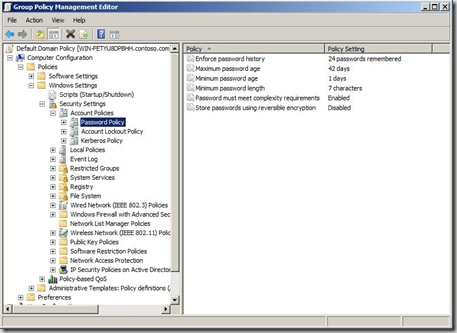
    1

    So now we need to create the Password Setting object (PSO). in order to do that we need to open the ADSI edit. I have to warn ADSI edit is not a place to mess around with unless you know exactly what you're doing!

    Go to Start--> Administrative tools --> ADSI edit --> select the default settings to connect to the domain. After that in order to create the PSO browse to Expand to Default Naming content\DC=Contoso,DC=com\CN=System\CN=Password Settings Container\

    Right click and select new Object,
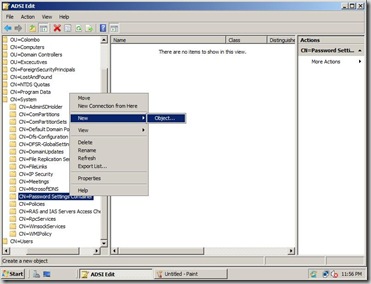
    3

    After that you have to select msDS-PasswordSettings and click next

    5

    After that we are coming to complex part of giving the parameters, this is the place you have to pay attention and provide the correct parameters. For detail step by step you can visit here

    First setting being ask is to provide a name for the policy, you can give an fancy name but stick to a one that is meaningful,

    6

    Next setting is msDS\PasswordsSettingsPrecedence. Assuming the user is a member of 2 or more groups and having different password polices the number you set here will determine which policy to take procedure. So set the value to 1 to make sure this policy will apply all the time to Neo

    test

    Next one is msDS-PasswordReversibleEncryptionEnabled which is self explanatory

    8

    Next few option are really self explanatory so I'll insert the parameter and the value until we come up with another interesting value :)

    msDS-PasswordHistoryLength (Also self explanatory... you can keep up to 1024)
    Value = 10

    (domain default: 24)

    · msDS-PasswordComplexityEnabled (Upper, lower, number, blah blah blah)
    Value = True

    · msDS-MinimumPasswordLength (If only everyone were using pass-phrases instead of passwords)

    Value = 5

    After that we are being request to provide values for MinimumPasswordAge, MaximumPasswordAge, LockoutObservationWindow, and LockoutDuration.

    So let us walk through the first one of this kind, msDS-MinimumPasswordAge

    12

    In the above picture I have provided the value of 1 day. First section is days, then hours, minutes and seconds. Next is

    msDS-MaximumPasswordAge
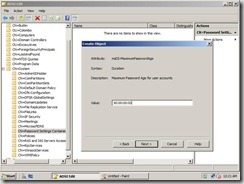
    13

    I hope rest process will be easy for you as we discuss here. so instead of the screenshots let me provide the values as follows,

    msDS-LockoutThreshold

    Value = 0

    msDS-LockoutObservationWindow

    Value =00:00:06:00

    msDS-LockoutDuration

    Value = 00:00:06:00

    Once you complete the last step you will click the Finish button to complete the steps. If you encounter any errors please have a look into the values you have provided.

    15

    so now we have provided Neo minimum characters 5 to his password and still enabled the Password complexity parameter and provide less time value for the Lockdown duration :)

    but still we are not completed because we have to tell the system this PSO need to be apply to Neo. If we double click the
    msDS-PSOAppliesTo parameter we have the option to provide the particular user's or Group's DN.
    20

    so now what how to find the DN value? well my friends we have to walk to the Active Directory Users and computers, and enabled the Advances Features,

    17

    After that we need to go to the properties of the Neo's account and select the Attribute Editor which shows the DN of Neo's user account.

    18

    Copy that value and we go back to the ADSI editor CN=System -->CN=Password Settings and under the current PSO paste the values you have copied from Neo's account,

    21

    Wola that complete the lengthy task.

    For more information you can refer here,

    1/16/2009

    SBS 2008 in the test run under my Lappie

    After doing some several testing in my desktop I thought of giving a try to run the Small Business Server 2008 in my laptop. Found our favorite virtulization method won't have a chance in my laptop since it only had 4 GB memory. SBS throw out a error saying memory is not enough when I allocated 2 GB for the VMWare vpc. (duh) So How came I came across the problem?

    Well of course allocating one logical partion to the OS and transferring 80 GB of data to another location (pretty tuff job  waiting for the data transfer complete) Once completed I end up doing the dual booting with my Vista OS.

    Installation ran smoothly and I didn't see much difference at all and took around 20 minutes for the first phase. SBS didn’t;t detect my wireless Lan card and I was not surprised about it at all. Managed to install the Lan driver separately and hope to run around with SBS in my bag. Too bad SBS really sloooow in my Laptop even it has been a Centrino 2 technology.

    Found out Lappies are not the best method unless if you have 7200RPM drives and 8 GB memory in your laptop. So SBS you'll be in my desktop for sometime. Look forward to do a live migration in few weeks time and hope to share my experience in that soon.

    1/14/2009

    Windows SBS 2008

    It's been a while I have been away from SBS world and into the windows 2008 OS. But after the announcement of the Small Business Server 2008 by Microsoft I did went for a digging. The information I found about the improvement for the product was amazing. First of all SBS server has received a new brother called as EBS (Essential Business Server) which has the capability to outcome the the 75 cals limitation and go up to 300 cals. Microsoft now have a clear segmentation of the Small Business market and the Mid size business market.

    12/13/2008

    Virtual machine addins for Server Core

    So you're eager to get your hands dirty on Microsoft latest OS, maybe you already have. As techies we always intend to be on virtual PC's to test the latest stuff and learn new settings and tweaks. Windows server 2008 has more to offer in this area. Windows core is pretty interesting method of using the windows server OS.

    One problem I came across with server Core is how to install the virtual machine addins to it. I'm using Microsoft virtual PC 2007 and after the initial OS setup I ran the virtual PC addins from the actions menu. Well it suppose to star the installation automatically right... well too bad it didn't happen. I hope you folks are well aware why we need the virtual addins to the virtual PC. Basically they are emulated drivers which enhance the response in the virtual machine and communication between the guest and the host PC.

    image

    So in order to install the addins you need to mount the cd / iso image to virtual PC. Under action menu when you click install the virtual PC addins it automatically mounts the iso image to the cd-rom in the virtual PC. To verify that you can click the CD icon in the menu and see if you have the option Release "VMaddtions.iso" So rest we carry out in the command prompt.

    image

    In my case the cd rom drive letter is D. If you have more than one virtual HDD installed then the drive letter can be different. Never the less you can browse the virtual CD and then get into the windows folder and then run the Setup.exe Once that start you'll able the see the GUI installation of the virtual machine addition setup.

    image

    In the above picture I have been prompted to remove the addins since I have already installed them earlier. But I hope you guys get the point.

    12/02/2008

    Network shares not accessible in Windows 2008

    I have recently installed Windows server 2008. After that upgraded it as a Domain controller. (more information will come in future about this) Since after that our internal users have
    experienced network /connection problems to the server.
    At least once a day I must reboot the server so that users can access the shared folders in the server. Since I host a database in this machine this problem has become a real headache and a panic to me.

    Users with offline files get notice that they are no longer connected to the server. They can't sync etc.
    When this happens you can still ping the server. Remote desktop to the server works 100% and the server seems to be working without any error.Tested the cabling and all the links passed the tests.

    So finally found out the problem relates to Symantec EndPoint protection anti virus software. I've been using ver 11 MR2. Further digging into this matter came up with the below mention article released by Symantec

    http://service1.symantec.com/support/ent-security.nsf/docid/2008061812370848?Open&seg=ent

    Apart from that Microsoft has acknowledged this problem can occur if you're having outdated NIC driver.

    After removing the AV software users back to business. I guess I'll have to test out the latest version of the Symantec (MR3) and then see if that solved the problem. Will update you all once I get my hands into SEP MR3 version.

    11/30/2008

    Installing Ubuntu 8.10 To A USB Flash Drive

    ONE of the features of Ubuntu 8.10 I have overlooked in my recent review was the utility included for creating a bootable version of Linux OS on a USB Flash memory stick.
    Personally I love the idea of having a whole operating system on a memory stick - it appeals to the geek in me and I love the look on a non-geek's face when you boot up their machine and your operating system comes up instead of theirs!
    But one of the issues I have frequently come across with such pocket-sized OSes is, how to make them persistent ie. getting any changes you make in the live environment to remain for your next boot.
    With the latest version of Ubuntu, however, everything you need is included in the GNOME menu - just look in System>Administration>Create a USB startup disk (this was also available in Ubuntu 8.04).
    The procedure to get Ubuntu installed, working and persistent is really very simple indeed.

    1. Download the Ubuntu 8.10 ISO and burn it to a CD
    2. Restart your computer, booting from the Live CD
    3. Insert a 1GB or larger USB flash drive
    4. Navigate to System>Administration>Create a USB startup disk
    5. Next, select the USB disk to use, select the option 'Stored in reserved extra space' and adjust the sider to set the capacity you wish to use (I set mine at 2GB on an 8GB stick), then click the 'Make Startup Disk' button. It is not a fast process, so go and make a coffee
    6. Once the installation is complete, simply remove the CD, restart your computer and set your boot menu or BIOS to boot from the USB device.

    This last step will vary according to how you BIOS is set up, but on my machine it was a case of holding down the F2 button during the boot process, then editing the Boot Devices section to make sure USB came first, followed by CD then HDD.
    And that, basically, is it. Thanks to Ubuntu's inclusion of the application Casper, any subsequent changes you make or data you create will be saved in the slice of the flash drive you created during step 5.
    So as you can see this feature will become very handy if you want to help someone to recover files in his/her computer when things go wrong.

    Windows XP and Vista also can be customized like this but not for the USB level but as bootable cd/DVD. BartPE is a good place to look into how to part.

    11/29/2008

    End of Microsoft OneCare and new kid in the block

    Microsoft has recently announced their plan to stop selling the Live OneCare security suite by June 30 2009 and the intention to replace it with a free security kit called Morro.
    Morro will be a PC security solution but will be also have a smaller footprint tailored for “smaller PC form factors” such as netbooks, and will be “ideal for low-bandwidth scenarios or less powerful PCs”. It will offer protection against viruses, spyware, trojans and rootkits. Morro will use the same engine as Live OneCare does.
    Morro is announced for the second half of 2009 just in time for Windows 7 and Vista SP2. Morro won’t be integrated into Windows, but it will be offered as a separate download, perhaps in order to avoid another antitrust suit. It will offer basic malware protection for Windows XP SP3, Vista and future Windows 7. Morro will be free.
    Microsoft has also announced that it will discontinue the Live OneCare subscription by June 30 2009. Beside security protection, Live OneCare currently offers printer sharing, data backup and PC tune-up, features that will not be made available in Morro. Live OneCare costs $50 for 3 PCs for one year and counts for 2% of the market, while Live OneCare for Server is a dead product which might explain the move.

    8/13/2008

    Server migration made easy with Symantec

    This is a another successful job I complete recently which I wanted to share with you all. The scenario is to move an production application service from a desktop PC to a new server with minimal impact to the production environment. 
    The desktop has been running Latest Anti virus Management service in it with windows 2003 server OS and serving nearly 1000 clients PC's. Everything running smoothly until we hit the idea of this was running in a standard desktop PC.

    So we brought a new IDM server with a Xeon processor and a Raid 0 build. Our main task has been moving the AV server database and the roles from the production PC to the server but not doing any installation at the client PC's. Client PC's' has been distributed around the country and hence doing any modification to all of them would take months time which we dare even to dream. So we came up the idea of testing this with one of the software offered by Symantec called as Symantec Backup Exec System Recovery.

    First we install the software the production server and ran the Liveupdate to make sure it get the latest software updates to the particular software. After that we had to register the product. Registration is necessary if you're doing a migration for dissimilar hardware which is true in our case. Ran the disk cleanup and in house cleaning for prior to the image creation. After that using the BESR we created and image of the C partion in a network drive.

    Now the part of moving the image to the new server. Before that according to the Symantec information we created a custom bootable recovery CD. This CD has a database of most hardware device drivers you can find in the market. Boot the new server with the BESR recovery CD and once boot we are been welcome to a VISTA PE environment and asking the question to star the network services. Since we have our image created in a network share we wanted to start the network service in the new server. Assign a static IP to the new server and then we map the network which contains the image. Once that completed in the main page we had the option to select to recover my computer and then give the path to the image file. Once the image has been identified we have to go through several screen requesting how we want to restore the image, one important option is to select we're doing a restore to a different hardware. Apart from that you get the chance of changing the partion size, verify the image after restoration, restore the MBR...etc. Once those options has been adjusted it matter about the time it take to restore the image from the network to the target machine. Restoration time will be entirely depend on the network or the hardware equipment. If you have copied the image to a external removable media and trying to restore it from there this process will be much more quicker. For the above process it took 25 minutes to restore 30GB image over the network. Assuming if you had gigabit network or less traffic in that network the time will be reduced dramatically.

    Once the restoration is completed target server restarted and went through the process of detecting the new HAL components. The only time it stops is for requesting the raid controller driver which we provided from the network location path itself which we have copied earlier. Once the process is completed we had to add the server to the domain. Entire process took around 1.5 hours and the new serer is up and running to server the clients!!

    As you can imagine this is real time save to move old servers to new servers without a sweat. We've been using this tool to convert our live servers to virtual environment then virtualizes all the servers as well. If you have specific questions you can PM me or alternatively you can meet me via
    MSN susanthasilva@hotmail.com

    I've provide few links below which describe about the above mention software,

    http://www.symantec.com/business/products/family.jsp?familyid=backupexec

    http://techcenter.symantec.com/ecampus/enterprise?siteName=sena&courseNo=DP6000

    4/27/2008

    New era in Anti virus software

    This is silent war topic going on the AV vendors. As a person who's work related to this industry I thought of sharing my 2 cents opinion on this.

    Few years back working with AV with the signature file updates has been pretty adequate. But the landscape changed dramatically with the rise of the various vulnerabilities coming from web as well than any one expected. So here we are now talking about spyware, malware, browser hijacking, man in the middle attacks, bots, phishing...etc (more to come in da future) So now all the AV vendors has identified protecting Pc's from virus signature files is no longer a reliable solution. So now we've been offered with a new solution called EndPoint Protection. So this time the explanton is we not only need to protect the individal pc's but as well as the endpoints like network ends. In a certain way this makes a pretty sense. Most of the employees are now working mobile and heavily depend on mobile devices like laptops, palmtops..so when they roam around the country, world they can bring pretty nasty vulnerabilities to your network. So this is the place where your first defense should work. In firewall we talk about this as layered security. So we protect the network from the endpoint level so Pc's will be check against the company security polices even before they are allowed to connect to the co-operate network. So the last defense would be the antivirus with various other components integrated.

    So my understanding is network administrators and security mangers would give more attention to this and identify why endpoint security is more reliable. So the main quote is "AV is not enough for your company" Many AV vendors has already adopted this technology and come up with various solutions. Symantec, Mcafee, Kaspersky has already entered to this race. So give it a consideration how should you protect your network and doing so save your neck....!!!

    3/21/2008

    VMware ESX Server 3i

    It's been a while away from the blog. Been busy with new products related to Symantec. Well as you may all know Symantec is company famous for anti virus software right?? well not at all, it is selling antivirals for home users and enterprise market but the company is armored with more than 35 products itself and continue t grow everyday by technology accusation's. Anyway I went too far with Symantec products because now I'm working on those products.

    So VMware back into my life with their latest edition for the enterprise market. VMWare ESX server. Now we all ma have used VMware workstation for and VMware server in our home pc's for testing applications and operating systems. But VMware ESX is the big daddy of all of them and actually involve in server virtualization, resource management and cost savings...etc. This product is not depend n windows or Linux as a host OS but starting with it's own OS! By doing so it make sure it'll take minimum hardware resources from your actual serer and let the raw power to be distributed to the virtual PCs. Most of the enterprise data centers move to VMware ESX for numerous reasons and few are as follows,

    1 Decreases power, cooling, floor space and infrastructure.
    2 Simplifies disaster recovery and business continuity requirements.
    3 Increases server utilization from the typical averages of 5-15% to 60-80%.
    4 Faster deployment of information technology resources reduces time to market.
    5 Lower operational costs associated with reduced resource management and administration.
    6 Improves application performance by dynamically adapting storage and server resources to meet peek usage cycles. and much much more.
    So I thought of sharing some VMware guru's articles into this blog to make it more useful for everyone.

    http://www.petri.co.il/vmware-esx-server-3i.htm

    http://www.petri.co.il/vmware-infrastructure-esx.htm

    http://www.petri.co.il/vmware-consolidated-backup-utilities.htm

    Happy Virtualization to all.

    1/01/2008

    Happy New Year 2008!!!

    It's a another fresh start and lots of things to cover. So how it's going to be for us in IT side? Well let's ride and see...

    10/25/2007

    P2V (Physical to Virtual) Conversion

    This is the concept that been buzzing around the IT world. Convert your physical machine to Virtual.(Not exactly the correct meaning as it is, but we’re talking about converting the OS and the apps in the physical to virtual OS that can be run on any platform. VMware company goes extra mile to introduce this method and really keep on their word on it. They are so keen about this concept and released out a free tool to people to test this method. This software can be downloaded here (http://www.vmware.com/download/converter/)

    Actually they have come with 2 version and more details can be found from the VMware web site itself.

    So I took the liberty of testing this out in our office Exchange server!!!!! (People don’t try this out in your office unless you got a another job) I have given a task of cleaning out the mess in our exchange server and remove the unnecessary mail boxes. Knowing this clean is not the best method than a fresh installation I thought of trying this out. So my first task is downloading the software and then install it to the Exchange server itself. After that I make sure we have a spare server or a hard disk with enough free disk capacity for the migration. Armed with all the necessary tools and the brains start the process. Cannot recall the whole time it took for the conversation but I assume it was around 6 hours. (I start the process in a weekend and found it was completed when I arrived to office on Monday)

    So what I found is a 30GB vmdk file! Start the Virtual server in a dual core machine and start the vhdk file assigning 1GB ram. The process went smoothly and after the bootup I had to install the VMware tools get the connectivity with the actual network. After assigning the IP connectivity I brough down the physical PC down. I ran the company Exchange server in a virtual environment for 2 weeks time. The only problem I found is network card stop sending packets and loosing the connectivity once in a while. I assume I have not done a proper house work for the virtual file. (Assuming I have to boot the virtual OS in safe mode and remove the existing network cards and then let the VMware tools to install its emulated network drivers.) But apart from that whole project is a success.

    I really like to hear from others who have done a process like this. My next plan is to host a SharePoint portal server and our anti virus server (Symantec Endpoint Security) in virtual appliances and host in one physical server.

    Virtualization is a cool concept and sooner or later it will crawl into you office too. So be prepared!!!

    7/08/2007

    So I'm MCSA now

    Well I'm so glad I made it. I've been out of the certification track after doing my Small Business Server exam in year 2006.
    It relly took me 2 months time and my previous job experince really helped me in that. I still think SBS exam is really worth for the money. The product itself really cool and really look forward to post some information about it soon. One cool product I start to fall in love is Microsoft ISA server 2004/2006. I know Cisco rocks in everyones minds, but this is a cool product to give a serious thouhgts. Glad to Local IT security giving attention to that. Look forward to share some information with other peer members about this product.

    So that's my small roaring about the MCSA and look forward to get few more certificates under my belt and look foward to Windows 2008.

    4/22/2007

    Ubuntu back in action

    Ubuntu Linux has released their latest desktop version-Ubuntu 7.0.4 aka "Feisty Fawn"

    In my previous articles I've mentioned I use the version 6.06 and 6.10 and been really impressed with their easiness of usage. New version has even more promsing features and also options to data and user migrations from windows operating systems. The truth is Microsoft Vista has been requesting lots of resources leaving it's customer base with less options. Most of them are looking for alternatives and to keep their existing PC's. Specially in Asian countries windows Vista migration might get slower phase due to the Computer hardware component prices. Microsoft still hasn't come up with good pricing schmene for the developing countries and this is another kep point they loose average Joe's. Anyway I've not yet installed the latest version cause it's still on it's way through ADSL line (lol)
    Will update the blog one I get my hands dirty on the product. But in da meantime I found out the following features and offered bt the product,

    Windows migration tool - The new migration tool recognises Internet Explorer favorites, Firefox bookmarks, desktop wallpaper, AOL IM contacts, Yahoo IM contacts and imports them in Ubuntu. This offers easier and faster migration for new users of Ubuntu and individuals wanting to run a dual partition. In addition to single accounts, you can migrate several users' settings in Ubuntu. (I think this may get rapid improvement to support more data to be transferred)

    Easy installation of multimedia codecs -Playing an MP3 or other media file just got a lot easier. If the required pieces are not yet installed, 7.04 will get the correct codecs for you, no more searching and no need for long and complicated instructions.

    Easier connection to wireless networks - This is really timesaver. Just like windows XP wireless configuration options. Configuration going to be breeze.

    apart from that Ubuntu 7.0.4 using the latest kernel (2.6.20) and Gnome's most awating 2.18 desktop enviroment.

    1/21/2007

    Cannot clear ARP cache

    I've been facing this matter numerous times. Couldn't find the cause of it until today. This time problems occurs in windows 2003 server computer after installing RRAS (Routing and Remote Access Service) . As soon as I start the service server couldn't access the internet and won't allow new clients to join the network. Stopping the service allowed me to connect to the service but won't allow to join new clients to the domain.
    After quick Googling I found out this problem is common for all windows versions. Foud out various answers and most popular one is clearing the ARP cache through command line (netsh interface ip delete arpcache) Microsoft has been kind enough to offer the solution starting from ABC (http://support.microsoft.com/kb/314067)
    Just a another day in computer nightmare! Hope to see a ray of light tomorrow. Will post as soon as I come up with an answer.
    Cheers